A hitch carrier interferes with parking sensors because the carrier or its cargo sits inside the area those sensors monitor. The sensors detect the carrier as a nearby obstacle, which can cause constant beeping, warning messages, or even reverse automatic braking on some vehicles.
Below, I’ll explain why this happens, why a loaded carrier often causes more trouble than an empty one, and how you can manage the problem without compromising safety.
Key Takeaways
- Hitch carriers can sit directly inside rear parking sensors’ detection zones.
- Ultrasonic sensors may treat the carrier as a nearby obstacle.
- A loaded carrier usually causes more interference than an empty basket.
- Some vehicles may activate reverse automatic braking unexpectedly.
- Trailer mode can disable rear sensors on certain vehicles.
- Trailer wiring does not automatically mute sensors on every vehicle.
- Always account for the carrier’s extra length when reversing.
Why Does a Hitch Carrier Interfere With Parking Sensors?
Your parking sensors are doing exactly what they were designed to do. The problem is that they cannot always distinguish your hitch carrier from an obstacle behind the vehicle.
The Carrier Enters the Sensor’s Detection Zone
Most rear parking sensors are built into the rear bumper. They monitor a specific area immediately behind your vehicle.
When you install a hitch-mounted cargo carrier, part of that carrier may enter this monitored area.
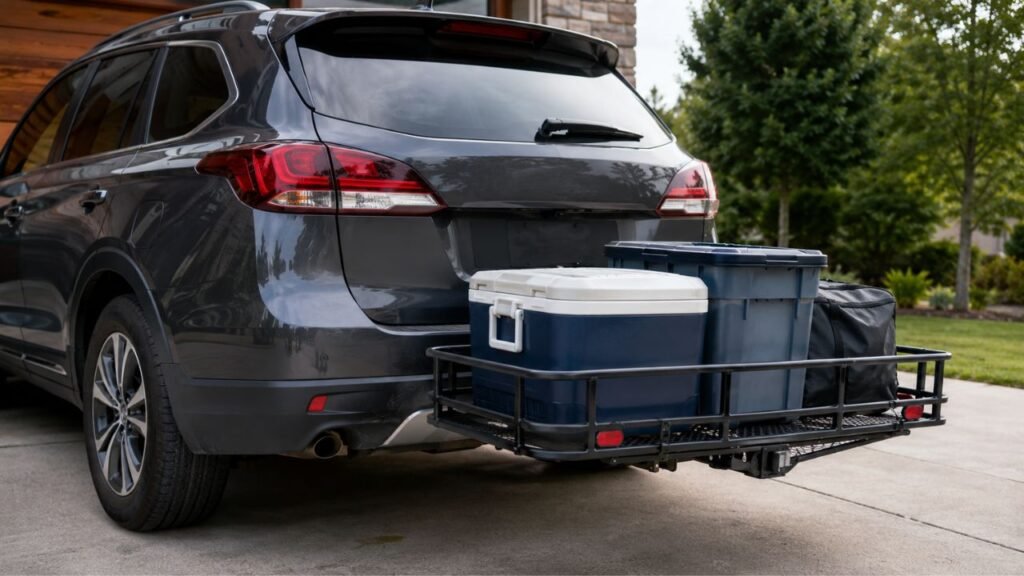
The sensors can then detect the basket frame, platform, cargo box, cooler, bike rack, or other equipment attached behind your bumper.
From the vehicle’s point of view, there is simply an object very close behind you.
That is why the warning often begins as soon as you shift into reverse.
Ultrasonic Signals Bounce Back From the Carrier
Many vehicles use ultrasonic parking sensors.
These sensors send high-frequency sound waves behind the vehicle. Those waves bounce off nearby objects and return to the sensors.
The vehicle measures how quickly the sound returns. It then estimates how far away the object is.
Your hitch carrier can reflect those signals almost immediately.
The vehicle may therefore think an obstacle is only a few inches from your bumper.
This can produce rapid beeping or a continuous parking warning.
The Vehicle Cannot Tell a Carrier From a Real Obstacle
A parking sensor usually does not know what it is detecting.
It simply knows that something solid is close.
The system cannot reliably decide whether that object is:
- A wall
- Another vehicle
- A shopping cart
- A trailer
- A bike rack
- Your hitch cargo carrier
That is why the alerts can continue even though the carrier is safely attached to your own vehicle.
Cargo Can Make the Problem Worse
An empty basket may not trigger the sensors at all.
Load it with several storage bins, however, and the situation can change quickly.
Your cargo creates a larger solid surface behind the vehicle. It may also sit higher than the carrier frame.
That higher surface can enter the sensors’ main detection area.
For example, an empty basket might sit below the bumper sensors. Add two large coolers, and those coolers may sit directly in front of them.
This is why some drivers notice no problem until they actually load the carrier.
Why Does an Empty Carrier Sometimes Work Fine but a Loaded One Beep?
An empty hitch carrier may sit low enough that your parking sensors barely notice it. Once you add cargo, however, the load can rise directly into the sensors’ detection area.
Cargo size matters quite a bit.
Large totes, coolers, generators, camping bins, and luggage create broad surfaces that reflect ultrasonic signals easily.
The position of your carrier matters too.
A receiver with a rise adapter may position the platform higher behind the bumper. A lower-mounted carrier may sit underneath the strongest part of the sensor field.
Your particular vehicle also matters.
Rear sensors sit at different heights and angles depending on the bumper design. A carrier that causes no trouble on one SUV may trigger constant alerts on another.
The carrier’s loaded weight can also slightly change the vehicle’s rear stance. That is usually not the main cause, but it can change how the sensors line up with the load.
For that reason, test your carrier both empty and fully loaded.
That gives you a much better picture of how your actual setup behaves.
Which Hitch Setups Are Most Likely to Trigger Parking Sensors?
Different hitch accessories occupy very different areas behind the bumper. That means the likelihood of parking-sensor interference changes depending on what you attach.
| Hitch Setup | Sensor Interference Risk | Why It Happens | Typical Result |
| Receiver only | Low | Most of the receiver stays below the bumper | Usually no warning |
| Ball mount or tow ball | Low to moderate | Hardware may enter the sensor field | Occasional false warning |
| Empty low cargo basket | Low to moderate | Basket may sit below the sensors | May work normally |
| Loaded cargo basket | High | Cargo creates a larger reflective surface | Frequent or constant beeping |
| Platform bike rack | High | Rack and bikes cover much of the rear area | Repeated warnings |
| Folded upright carrier | High | Carrier sits closer to the bumper | Alerts even when unloaded |
| Trailer | High unless recognized | Trailer occupies the area behind the vehicle | Sensors may beep or mute automatically |
One important point is that carrier position matters more than the hitch receiver itself.
You can often leave a receiver installed without trouble. Problems usually begin when a larger accessory extends behind or above it.
Can a Hitch Carrier Cause Automatic Braking While Reversing?
Yes, it can happen on vehicles equipped with reverse or rear automatic braking. The exact behavior depends on how your vehicle uses its rear sensors and driver-assistance systems.
How Rear Automatic Braking Can Get Triggered
Some newer vehicles use rear sensors as part of an automatic braking system.
The system watches for obstacles while you reverse.
If it believes something is dangerously close behind the vehicle, it can warn you. Some systems can also apply the brakes.
A hitch carrier may look exactly like that type of obstacle.
Your vehicle does not necessarily understand that the object is attached to the hitch.
This can lead to unexpected braking when you are trying to back out of a driveway or parking space.
Why This Is More Than an Annoying Warning
Constant beeping is frustrating, but unexpected braking deserves more attention.
You might be reversing slowly at a campground when the vehicle suddenly stops.
That can make precise maneuvering difficult.
It can also be confusing when you know there is plenty of open space behind your cargo carrier.
Before using a loaded hitch carrier, learn how your vehicle’s rear automatic braking behaves.
Why You Should Check Your Owner’s Manual
There is no universal method for disabling rear parking assistance.
One manufacturer may use a dashboard button. Another may place the setting inside the infotainment system.
Some vehicles separate parking sensors from automatic braking. Others group several features together.
Check the owner’s manual for your exact model and model year before changing anything.
That helps you understand exactly which safety features you are turning off.
Does a Hitch Carrier Affect Rear Cross Traffic Alert Too?
Parking sensors and Rear Cross Traffic Alert are not the same system.
Parking sensors usually focus on objects very close to your bumper. Rear Cross Traffic Alert is designed mainly to detect vehicles approaching from the sides while you reverse.
Many Rear Cross Traffic Alert systems rely on radar rather than the same ultrasonic sensors used for parking assistance.
That means your parking sensors can be disabled while another rear safety feature still works.
However, you should never assume every system remains active.
A large cargo carrier may physically block part of a sensor’s view. Some trailer modes can also change how driver-assistance features operate.
The safest approach is to check your vehicle’s information display after activating trailer mode or disabling parking assistance.
And remember that no electronic system automatically eliminates the carrier’s extra length.
You still need to judge rear clearance yourself.
How to Stop Parking Sensors From Beeping With a Hitch Carrier
There are several ways to manage the problem. Start with the method your vehicle manufacturer provides before trying aftermarket workarounds.
1. Use the Parking-Sensor Off Button
Many vehicles have a dedicated parking-assist button.
It may show a letter “P,” a sensor symbol, or a similar parking icon.
Pressing the button can temporarily mute the rear sensors.
This is often the easiest solution when you only use your hitch carrier occasionally.
Keep in mind that some vehicles turn the system back on automatically after restarting.
2. Disable Rear Parking Assistance Through Vehicle Settings
Some vehicles let you control parking sensors through the dashboard or touchscreen.
You may be able to turn off only the rear sensors while leaving other features active.
This can be useful when the carrier stays installed for several days.
Do not assume the setting is permanent.
Your vehicle may restore the sensors after the next ignition cycle.
3. Check Whether Your Vehicle Has Trailer Mode
Trailer mode can change how the vehicle handles rear parking assistance.
On some vehicles, activating trailer mode disables certain rear sensors because the system expects an object to remain behind the bumper.
That can stop nuisance warnings.
However, trailer mode may also change other vehicle functions.
It might affect stability control, blind-spot monitoring, automatic braking, or other driver-assistance settings.
Use it only when your vehicle manufacturer says it is appropriate for your setup.
4. Check Whether Trailer Wiring Automatically Mutes the Sensors
Some vehicles recognize an attached trailer through the factory trailer wiring system.
When the trailer connector is plugged in, the vehicle may automatically mute its rear parking sensors.
That behavior can work very well when towing.
A hitch cargo carrier is different.
Most cargo carriers do not connect to the trailer wiring unless they have lights or another electrical accessory.
Because of that, your vehicle may never realize anything is attached.
It simply sees your carrier through the parking sensors and warns you.
5. Reposition the Carrier When the Design Allows It
Sometimes changing the carrier’s height can reduce interference.
A lower carrier may sit underneath the main parking-sensor field.
However, do not lower it without considering ground clearance.
The carrier still needs enough clearance for steep driveways, dips, curbs, and road transitions.
You should also follow the carrier manufacturer’s instructions regarding hitch adapters and receiver position.
Do not make a sensor problem disappear by creating a ground-clearance problem.
6. Remove or Lower the Carrier When You Are Not Using It
Some folding carriers create more interference when folded vertically.
In the upright position, the basket moves much closer to the bumper.
That can place it directly in front of the sensors.
If your carrier design allows it, leave it in its recommended driving position when appropriate.
Otherwise, remove it when you no longer need it.
7. Have Persistent Problems Diagnosed
Parking warnings should normally disappear after you remove the carrier.
If they do not, there may be another problem.
Common possibilities include:
- Mud covering a sensor
- Snow or ice buildup
- A damaged sensor
- Bumper misalignment
- Previous collision damage
- Loose wiring
- Improper sensor installation
- Problems following bumper or hitch work
If the system reports an actual parking-assist fault, have it inspected.
Should You Use a Dummy Trailer Plug to Disable the Sensors?
You may see owners online recommending a dummy trailer plug or adapter that makes the vehicle think a trailer is connected.
That can work on certain vehicles.
I would not treat it as a universal fix, though.
Trailer detection can change much more than parking-sensor behavior.
Depending on your vehicle, it may affect automatic braking, blind-spot monitoring, stability functions, camera settings, or trailer-specific safety features.
A workaround that stops the beeping could therefore disable something you still want.
Use manufacturer-supported settings whenever possible.
If you want to use a plug-based workaround, first confirm exactly what your vehicle changes after detecting a trailer.
What Should You Do Before Backing Up With a Hitch Carrier?
Disabling a parking sensor solves the warning problem, but it also removes some assistance. Make a quick visual check part of your routine whenever the carrier is attached.
- Walk behind the vehicle before reversing.
- Check that the load is still securely tied down.
- Remember how far the carrier extends past the bumper.
- Check whether cargo blocks your backup camera.
- Confirm which parking systems are currently disabled.
- Use both mirrors while backing.
- Reverse slowly in tight areas.
- Allow extra clearance around curbs and parked vehicles.
- Use a spotter when visibility is poor.
The most important thing is remembering that your vehicle is now longer.
Your rear bumper is no longer the last part of the vehicle.
How to Tell Whether the Carrier or the Sensor Is the Problem
You can usually diagnose this at home without much difficulty. Test one part of the setup at a time so you can see exactly when the warning begins.
Step 1: Test the Vehicle With the Carrier Removed
Start the vehicle and shift into reverse in a safe, open area.
If the sensors work normally without the carrier, the accessory is probably causing the warning.
Step 2: Install the Carrier Empty
Attach the carrier without loading anything onto it.
Test the sensors again.
If they immediately start beeping, the carrier frame itself is entering the detection zone.
Step 3: Add Your Cargo and Test Again
If the empty carrier causes no problem, load it the way you normally travel.
Then test the sensors again.
Warnings that appear only after loading usually point to cargo height or position.
Step 4: Clean the Parking Sensors
Look for the small circular sensors across the rear bumper.
Clean away dirt, mud, wax buildup, snow, or ice.
A dirty sensor can create strange readings even without a hitch accessory.
Step 5: Check for Bumper or Sensor Misalignment
Think about any recent bumper repairs or impacts.
A sensor that sits at the wrong angle may point toward the carrier more directly than it should.
Look for loose trim, tilted sensor rings, or obvious damage.
Step 6: Check Trailer and Parking Settings
Review your vehicle’s current settings.
Trailer mode may be active accidentally. Parking sensors might also have been changed during previous towing.
Confirm everything matches the way you are currently using the vehicle.
When Is the Problem Normal, and When Should You Have It Checked?
Carrier-related warnings are usually predictable. When the behavior becomes inconsistent or continues without the carrier, it is worth investigating further.
Usually Normal
- Warnings begin only after attaching the carrier.
- Alerts disappear when the carrier is removed.
- A loaded carrier triggers sensors while an empty one does not.
- The parking display consistently detects the carrier’s location.
- The warning starts immediately after shifting into reverse.
These signs generally suggest that the system is detecting the accessory normally.
Worth Investigating
- Sensors beep when nothing is behind the vehicle.
- The warning continues after removing the carrier.
- One rear sensor behaves differently from the others.
- The dashboard shows a parking-assist system fault.
- Problems started after bumper damage.
- Problems began after body or hitch installation work.
- Rear automatic braking behaves unexpectedly without the carrier.
- Trailer recognition turns on or off inconsistently.
Those symptoms point more toward a sensor, wiring, calibration, or software issue.
Can You Prevent the Problem When Choosing a Hitch Carrier?
You may be able to reduce parking-sensor interference by choosing a carrier that sits lower and farther from the bumper.
Open-frame baskets can sometimes create fewer reflections than large solid boxes.
Carrier height also matters.
A low-profile platform may stay below the strongest part of the sensor field.
However, there is no hitch carrier that can be guaranteed to work with every vehicle’s parking sensors.
Sensor height, bumper shape, receiver position, software calibration, and cargo dimensions all vary.
Even the same carrier can behave differently depending on what you load onto it.
If parking-sensor compatibility matters to you, look for feedback from owners using the exact same vehicle generation.
Then confirm any safety-system behavior through your owner’s manual.
Does Turning Off Parking Sensors Affect the Backup Camera?
Turning off your parking sensors usually does not turn off the backup camera because the two systems normally operate separately.
Your camera can often continue displaying a rear view even when parking alerts are muted.
However, trailer mode can behave differently.
Some vehicles change camera views or driver-assistance settings automatically when they detect a trailer.
Also remember that your hitch carrier can physically block the camera.
A tall cooler or large storage tote can cover most of the image even though the camera itself remains active.
So check both systems separately before relying on either one.
Final Words
A hitch carrier usually interferes with parking sensors because it sits exactly where those sensors expect to detect obstacles. In many cases, nothing is wrong with the parking system at all.
The issue becomes more noticeable once you load the carrier. Cargo adds larger, higher surfaces that can reflect sensor signals directly back toward the bumper.
Use your vehicle’s supported parking-assist or trailer settings when necessary. Most importantly, remember that disabling the warning does not remove the carrier itself.
You still need to account for every extra inch behind your vehicle when reversing.
Related FAQs
Will a Hitch Receiver Alone Set Off Parking Sensors?
It can happen, but a receiver alone usually causes fewer problems because most of it sits underneath the bumper. Larger ball mounts, hitch accessories, or carriers are much more likely to enter the sensor field.
Why Do My Parking Sensors Only Beep When the Cargo Carrier Is Loaded?
Your empty carrier may sit below the sensors’ detection area. Once you add coolers, bins, luggage, or other cargo, those items can rise directly into the area the sensors monitor.
Can a Hitch Bike Rack Trigger Parking Sensors?
Yes. A hitch bike rack and the bicycles mounted on it can occupy a large portion of the rear sensor area, making continuous or frequent parking warnings very common.
Can a Hitch Carrier Make My Car Brake While Reversing?
It can on vehicles equipped with rear or reverse automatic braking. The system may interpret the carrier or cargo as an obstacle and apply the brakes if it believes a collision is possible.
Will Trailer Mode Stop Parking Sensor Warnings?
Trailer mode may disable or change rear parking assistance on some vehicles. However, the exact behavior varies, and trailer mode can also affect other safety features.
Does Plugging Into the 4-Pin or 7-Pin Connector Disable Parking Sensors?
It can on vehicles that detect trailers through their wiring system. However, simply plugging into a connector does not guarantee that your rear sensors will automatically turn off.
Can I Permanently Turn Off Rear Parking Sensors?
Some vehicles allow rear parking assistance to remain disabled, while others automatically turn it back on after restarting. Check your owner’s manual for the exact behavior of your vehicle.
Will a Low-Profile Hitch Carrier Avoid Parking Sensors?
A low-mounted carrier may reduce interference if it stays below the sensor field. However, adding tall cargo can still put objects directly in front of the rear sensors.
Do Parking Sensors Protect the Hitch Carrier After I Disable Them?
No. Once rear sensors are disabled, they cannot reliably help you judge the space behind your carrier. You need to account for the carrier’s added length using mirrors, the camera, and direct observation.

Jack Collins specializes in RV routes, trail access, and travel logistics. His how-to articles help RV and trailer owners plan smoother trips and avoid common mistakes. Every review focuses on performance, safety, and value.