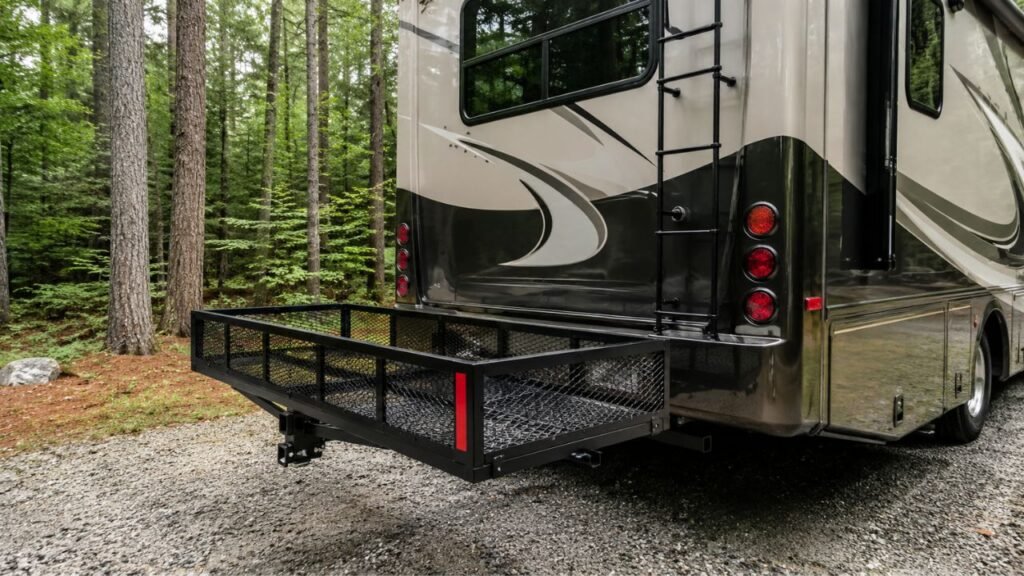
A hitch cargo carrier blocks your backup camera because it sits inside the camera’s low rear viewing angle. The carrier frame may cover part of the image, while coolers, totes, bags, or other tall cargo can block much more of the screen.
In this guide, I’ll help you identify what causes the blockage. I’ll also show you practical fixes, sensor considerations, and safer ways to reverse.
Key Takeaways
- Hitch carriers often sit directly inside the backup camera’s viewing area.
- Loaded cargo usually blocks more visibility than the carrier itself.
- Folding carriers can become more obstructive when stored upright.
- Parking sensor warnings are different from actual camera blockage.
- Some rear braking systems may react to hitch-mounted accessories.
- Rear camera guidelines may not account for added carrier length.
- An auxiliary camera can solve severe or permanent visibility problems.
- Always test the carrier fully loaded before starting your trip.
Why Does a Hitch Cargo Carrier Block the Backup Camera?
Most factory backup cameras are mounted near the vehicle’s rear center. You may find yours near the license plate, tailgate handle, or liftgate.
The camera points downward and backward toward the ground. That angle helps you see curbs, parking lines, and nearby obstacles.
Unfortunately, your hitch receiver sits almost directly below that viewing area.
Once you install a hitch carrier, the platform extends rearward. That places its frame inside the camera’s viewing cone.
The carrier may look fairly low when standing beside it. However, it sits extremely close to the camera.
That closeness makes the carrier appear much larger on the screen.
Your cargo can make the problem worse very quickly. A cooler or storage tote may rise directly into the camera’s view.
That is why an empty carrier might look acceptable initially. Once loaded, much of your rear view can disappear.
Nothing is necessarily wrong with the backup camera itself. The carrier has simply moved equipment into its normal field of view.
What Is Actually Blocking Your Camera?
Before changing anything, figure out what causes the obstruction. Sometimes the carrier causes it, while other times the cargo is responsible.
The Carrier Platform or Side Rails
An open cargo tray may block only the lower screen area. High rails, center supports, or thick frame tubes can block more.
Enclosed hitch cargo boxes usually create a larger obstruction. Their solid walls prevent the camera from seeing through them.
Low-profile mesh trays generally preserve more visibility than tall boxes. Still, every vehicle and carrier combination behaves differently.
Cargo Stacked Above the Carrier
Your cargo is often the biggest visibility problem.
Large coolers, plastic totes, generators, suitcases, and storage bags quickly add height. They may sit directly in front of the camera.
This explains why testing an empty carrier can be misleading.
Always check the camera after loading everything you plan to carry. The loaded setup is the one that matters on the road.
A Carrier Folded Upright
Folding carriers create another common problem.
When deployed horizontally, the tray may remain below the camera. Fold it upward, and the platform moves closer to the lens.
That vertical platform can cover a large screen area.
If your carrier folds, check the camera in both positions. Never assume the folded position provides better visibility.
Your Vehicle’s Camera Location
Camera placement differs considerably between vehicles.
Some cameras sit low near the license plate. Others sit higher inside a liftgate handle.
Pickup trucks may have cameras mounted directly into the tailgate.
A higher camera usually has a better chance of seeing over low cargo. However, tall loads can still block its view.
That is why one carrier can work beautifully on one SUV. The same carrier may create a huge blind spot elsewhere.
Which Cargo Carrier Designs Are Most Likely to Block the Camera?
Carrier design makes a noticeable difference in rear visibility. Still, camera height, hitch height, carrier rise, and cargo height also matter.
| Carrier Setup | Typical Camera Obstruction | Main Cause | Best First Step |
| Empty low-profile tray | Low to moderate | Frame or side rails | Check the live camera view |
| Open tray with tall cargo | Moderate to high | Bags, coolers, or totes | Rearrange or lower cargo |
| High-wall basket | Moderate | Tall rails plus cargo | Measure loaded height first |
| Enclosed hitch box | Moderate to high | Solid box body | Consider an auxiliary camera |
| Folding carrier upright | Often high | Vertical platform near camera | Test both carrier positions |
| Swing-away carrier | Varies | Carrier still sits behind vehicle while driving | Check normal travel position |
Treat these as general tendencies rather than guarantees.
A relatively short carrier can still block your camera badly. Meanwhile, another larger carrier may sit below the main viewing area.
The only reliable answer comes from testing your exact setup.
Why Does My Parking Sensor Keep Beeping With the Cargo Carrier Installed?
Backup cameras and parking sensors are separate systems. A carrier can interfere with either one, or sometimes both simultaneously.
The Sensors May Think the Carrier Is an Obstacle
Rear parking sensors usually monitor the area behind your bumper.
Once you install a cargo carrier, something now sits permanently inside that monitored area.
The system does not necessarily know you intentionally installed it.
As a result, your vehicle may beep repeatedly while reversing. Some vehicles may show a constant warning on the dashboard.
This does not always mean another obstacle is nearby.
The system may simply be detecting your carrier.
The Carrier Can Also Block a Sensor
Sometimes the carrier does more than trigger a warning.
A frame rail, cargo box, or large item can sit directly in front of a sensor.
That may reduce how well the sensor detects other objects behind you.
This creates an important distinction.
Your system may beep because it sees the carrier. Or the carrier may prevent the sensor from seeing something else.
Either situation deserves attention before backing into a tight campsite.
Why Rear Automatic Braking May Activate
Some vehicles combine rear sensors with automatic braking features.
If the vehicle believes the carrier is an obstacle, it may react. You might feel sudden braking while trying to reverse.
That behavior can surprise you, especially at a campsite.
Check your owner’s manual for hitch-mounted accessory guidance.
Some manufacturers provide specific instructions for temporary parking-aid settings. Others handle the situation differently.
Do not assume one vehicle’s procedure applies to every model.
Should I Turn Off the Rear Parking Sensors?
You may need to temporarily disable a rear parking feature. However, only do this when your vehicle manufacturer allows it.
Some vehicles provide a simple parking-aid button or settings menu. This can prevent constant warnings caused by hitch accessories.
But disabling a sensor does not restore your camera view.
It only stops or changes the electronic warning behavior.
Avoid switching off multiple safety systems unnecessarily.
Your vehicle may have separate controls for parking sensors, cross-traffic warnings, and rear automatic braking.
Use the owner’s manual to identify the affected system first.
Once the carrier is removed, restore your normal settings.
That keeps those features available when you actually need them.
How Do You Fix a Backup Camera Blocked by a Hitch Cargo Carrier?
Several fixes can improve your rear view. Start with simple changes before modifying the vehicle or camera system.
Load Tall Cargo Lower
Start by checking where your tallest items sit.
Moving a cooler or tote slightly lower may reveal more camera view. Placing tall cargo away from the camera’s centerline can also help.
However, do not sacrifice secure loading or proper weight distribution.
Visibility matters, but cargo stability matters just as much.
Reduce the Height of Your Cargo
One large storage bin may block much more view than two shorter bins.
Flatter cargo bags can sometimes work better than tall rigid containers.
If possible, divide your load into lower packages.
This can improve visibility without changing the carrier itself.
Use a Lower-Profile Carrier
A low-wall cargo tray generally creates less obstruction than a tall basket.
Open construction may also preserve some visibility through the frame.
Still, do not assume a product labeled low-profile will automatically work.
Check its platform height and rail dimensions carefully.
Your vehicle’s receiver height will determine where it actually sits.
Consider Carrier Rise and Hitch Geometry Carefully
Some carrier shanks include a built-in rise.
That extra height can improve ground clearance. Unfortunately, it may also push the basket upward into the camera view.
A lower carrier may improve visibility but create clearance concerns.
Do not add random hitch extenders or adapters just for camera clearance.
These components can change leverage, clearance, and load limits.
Always follow the vehicle, hitch, carrier, and accessory ratings.
Install an Auxiliary Backup Camera
An auxiliary camera can be a great solution for tall carriers.
The idea is simple.
You move the viewing point beyond or above the obstruction.
Some people mount an additional camera higher on the vehicle. Others mount one near the rear edge of the carrier.
That lets you see what the original camera cannot.
This approach is especially useful with large enclosed cargo boxes.
Wired vs. Wireless Auxiliary Camera
A wired camera usually offers a stable connection.
However, installation takes more time and may require routing cables.
A wireless system can be easier with removable carriers. It is often convenient when you only use the carrier occasionally.
Wireless cameras still require power and a suitable mounting location.
Signal reliability can also vary between systems.
Choose the setup that matches how often you use your carrier.
Should You Relocate the Factory Camera?
Relocating the original camera sounds simple but can become complicated.
Modern backup cameras may connect with parking guidelines, factory displays, and surround-view systems.
Moving the camera can change the image angle significantly.
Some systems may also depend on calibration.
For many owners, an independent auxiliary camera is easier.
If you plan to relocate factory equipment, professional installation is usually safer.
Can a 360-Degree Camera Still Work With a Hitch Carrier?
A 360-degree camera system does not remove physical obstructions.
Your vehicle creates the bird’s-eye image using several cameras. The rear camera remains part of that system.
If a hitch carrier blocks the rear camera, part of the stitched image may also become less useful.
You may still see the sides of the vehicle clearly.
However, the area directly behind the carrier can remain hidden.
Tall cargo may make the problem even worse.
Do not assume a surround-view display eliminates the carrier’s blind spot.
Always check the actual screen after loading your carrier.
Do the Backup Camera Guidelines Still Show the Correct Stopping Point?
Do not assume your factory parking lines include the carrier.
Those guidelines were designed around your vehicle’s original dimensions.
A cargo carrier can extend several feet behind the bumper.
That means the carrier may hit something before the vehicle reaches it.
The camera lines can still help with alignment. However, they should not become your only distance reference.
A simple controlled test can help.
Place a traffic cone behind the carrier in an open area. Slowly observe where the carrier’s rear edge appears on your screen.
Learn the actual relationship between the guideline and carrier.
Repeat the test whenever your carrier or cargo setup changes.
How to Check Camera Clearance Before You Leave
A quick inspection can prevent frustration at your destination. Run this check after the carrier is completely loaded.
- Park on level ground in an open area.
- Locate your rear camera and parking sensors.
- Install the carrier while it remains empty.
- Check the backup camera while stationary.
- Fold the carrier upright if that feature exists.
- Check the camera again in the folded position.
- Load everything exactly as you plan to travel.
- Recheck the camera with your tallest item installed.
- Confirm the carrier does not cover any sensor unnecessarily.
- Test parking warnings at very low speed.
- Watch for unexpected rear automatic braking.
- Confirm both taillights remain clearly visible.
- Make sure the license plate remains appropriately visible.
- Learn where the carrier’s rear edge appears onscreen.
- Recheck all straps before driving away.
This takes only a few minutes.
It can also reveal problems before you reach a crowded campsite.
Is It Safe to Reverse With the Backup Camera Partially Blocked?
A partially blocked camera gives you incomplete information.
You may still see pavement behind the vehicle. However, important objects can disappear behind the carrier or cargo.
Use your mirrors together with the remaining camera view.
Before reversing, walk around the vehicle whenever practical.
Look for picnic tables, posts, rocks, bicycles, children’s equipment, or campground hookups.
A spotter is especially useful at tight campsites.
Remember that your vehicle is now effectively longer.
The carrier may extend well beyond your original bumper.
Back slowly and stop whenever you lose confidence in clearance.
A camera is helpful, but it should never replace direct observation.
Is It Legal to Block a Backup Camera With a Cargo Carrier?
Federal rear-visibility rules require qualifying new light vehicles to have rear visibility systems.
However, hitch-mounted cargo equipment creates a separate situation. Temporary owner-installed accessories can physically interfere with the factory camera.
That does not automatically mean every blocked-camera setup is illegal.
It also does not mean every configuration is legal everywhere.
State rules may address license plate visibility, taillights, reflectors, lighting, or cargo projection.
Those requirements can vary by location.
Before traveling, make sure your carrier meets applicable state requirements.
Pay particular attention when your cargo blocks lights or plates.
Don’t Forget the License Plate and Taillights
Camera visibility is only one part of the rear-clearance problem.
Check these items before leaving:
- Make sure both taillights remain clearly visible.
- Confirm brake lights can be seen from behind.
- Check that turn signals remain unobstructed.
- Make sure the license plate is not hidden.
- Check whether your carrier needs auxiliary lights.
- Make sure any required reflectors remain visible.
- Confirm cargo cannot shift over lights while driving.
- Recheck the setup after your first fuel or rest stop.
A load that starts secure can shift during travel.
A quick inspection keeps small changes from becoming bigger problems.
Common Mistakes That Make Camera Blockage Worse
Many visibility problems come from simple setup mistakes.
Avoid these common ones:
- Testing the carrier empty instead of fully loaded.
- Placing the tallest cooler directly below the camera.
- Assuming an open mesh basket cannot block visibility.
- Forgetting to test the folded storage position.
- Assuming a 360-degree camera removes every blind spot.
- Confusing parking-sensor warnings with camera obstruction.
- Disabling several safety features at once.
- Trusting factory parking lines for the carrier’s rear edge.
- Adding hitch extenders without checking load ratings.
- Mounting cargo higher just to gain basket space.
- Relocating the factory camera before considering alternatives.
- Forgetting to check lights and license plate visibility.
How to Choose a More Camera-Friendly Hitch Cargo Carrier
If camera visibility matters regularly, carrier design deserves attention. Compare the full loaded setup instead of shopping by platform size alone.
Check Platform and Rail Height
Lower rails usually preserve more rearward visibility.
Tall walls can rise directly into the camera view.
Measure the platform and rail height before buying.
Then compare those numbers with your hitch and camera positions.
Consider Your Loaded Height, Not Just Carrier Height
Carrier specifications only tell part of the story.
A six-inch side rail means little if you add a 24-inch cooler.
Think about your tallest normal cargo item.
That loaded height is what determines the real obstruction.
Check the Folding Position
A folding carrier may look perfect while deployed.
Once folded upright, it can cover most of the camera.
Check product dimensions for the folded height and position.
This matters if you frequently drive with an empty folded carrier.
Measure Camera-to-Hitch Geometry
A few basic measurements can help before buying.
Check:
- backup camera height,
- receiver opening height,
- carrier platform height,
- built-in shank rise,
- basket wall height,
- intended cargo height.
These numbers help you estimate where the carrier will sit.
Exact camera visibility still requires real-world testing.
Look for Camera and Sensor Compatibility Information
Good manufacturers often provide fitment information for hitch accessories.
Look for details about parking sensors, rear cameras, and folding clearance.
Avoid assuming one compatibility claim applies to every vehicle.
Your SUV, truck, or crossover may have a different camera location.
Final Verdict
Your hitch cargo carrier usually blocks the backup camera because it sits directly inside the camera’s rear viewing angle. The carrier itself may cause some obstruction, while loaded cargo often causes much more.
Start by testing the carrier fully loaded. Rearrange tall items, reduce cargo height, and check the folded position. If the view remains seriously blocked, an auxiliary camera can provide a cleaner long-term solution.
Also pay attention to parking sensors and rear automatic braking. These systems may react differently once a hitch accessory is installed. Follow your vehicle’s manual whenever you change those settings.
Most importantly, remember that the carrier adds length behind your vehicle. Use mirrors, direct observation, and a spotter whenever your rear view becomes limited.
Related FAQs
Will Every Hitch Cargo Carrier Block a Backup Camera?
No. Camera height, hitch height, carrier design, and cargo dimensions all matter. Some low-profile carriers only cover the bottom of the screen, while taller baskets or enclosed boxes can block much more.
Why Can I See Over My Carrier Until I Load It?
The empty platform may sit below your camera’s main viewing area. Once you add a tall cooler, tote, bag, or generator, that cargo rises directly into the camera’s line of sight.
Can a Hitch Carrier Cause My Parking Sensors to Beep Constantly?
Yes. Rear parking sensors may detect the carrier as an obstacle because it sits inside their detection zone. Check your owner’s manual before changing any parking-aid settings.
Can a Cargo Carrier Trigger Automatic Emergency Braking in Reverse?
It can happen on some vehicles equipped with rear automatic braking. The system may interpret the carrier as an obstacle, so check the manufacturer’s guidance for hitch-mounted accessories.
Can I Move My Factory Backup Camera Onto the Cargo Carrier?
It may be possible, but modern factory cameras often integrate with displays, parking lines, and other driver-assistance systems. An independent auxiliary camera is usually easier for removable carriers.
Is a Wireless Backup Camera Good for a Cargo Carrier?
A wireless camera can work well for removable hitch carriers. It avoids long cable runs, although you still need reliable power, a secure mount, and a stable wireless connection.
Does a Swing-Away Cargo Carrier Fix Backup Camera Blockage?
Not necessarily. A swing-away carrier improves rear access while parked, but it normally sits directly behind the vehicle while driving. Camera obstruction can therefore remain unchanged.
Will a Low-Profile Cargo Carrier Block Parking Sensors?
It still can. Parking sensors use their own detection angles, so a carrier may trigger or obstruct them even when the backup camera still has a usable view.
Can I Rely on Side Mirrors If My Backup Camera Is Blocked?
Side mirrors help, but they cannot always show low objects directly behind the carrier. Combine mirrors with direct observation, slow reversing, and a spotter when space is tight.
Do Backup Camera Parking Lines Account for the Cargo Carrier?
Usually, you should not assume they do. Factory guidelines are designed around the vehicle’s original body dimensions, while a hitch carrier extends beyond the normal rear bumper.

Jack Collins specializes in RV routes, trail access, and travel logistics. His how-to articles help RV and trailer owners plan smoother trips and avoid common mistakes. Every review focuses on performance, safety, and value.